Sanity CMS is one of the most popular headless CMS among developers. It was born out of the struggle many companies face with inflexible and limited content management systems in terms of how content can be structured, managed, and distributed.
Most traditional CMS platforms focus on managing content for a single website, and they tend to impose a rigid framework, which limits customization and adaptability, especially for developers working on complex projects.
Sanity's official personalization plugin solves the content modeling side of AB testing and personalization. Everything downstream (identity, variant assignment, stickiness, exposure tracking, and statistics) is left to your team or to an external service like GrowthBook or LaunchDarkly. Croct covers that whole pipeline at the module level while your Sanity schemas stay untouched. This demo project gives you a better look at how it works.
Sanity was built to be developer-first and aimed to empower teams by allowing them to manage content as structured data. They love it because of its flexibility, scalability, extensibility, real-time collaboration, and developer-friendly tools and APIs.
Sanity's main applications are e-commerce websites, mobile apps, products and services, and marketing websites. If you're focused on these last two, there's something else you need to consider.
If your goal is to build a website that gives your content team autonomy to work without relying on developers, your main requirements right now probably are:
- It needs to be fast to load
- It needs to be indexed on search engines
- It needs to be scalable
- It needs to provide a good experience for content managers
But have you ever considered what comes next?
Growth teams don't use websites solely to publish content. They constantly seek the optimal journey, the lowest CAC, and the fastest way to convert users. Because of this, it's common for growth teams to require AB testing tools and personalization engines.
Right after launching your website, you'll soon learn that for businesses focused on personalized user experiences and AB testing, Sanity has limitations. In this post, we'll explore what Sanity is good for, its core challenges, and how you can overcome them.
Explore our integration template to run experiments, personalize content by audience, and analyze results without changing your CMS.

What Sanity is good for
Sanity CMS is a headless CMS designed to give developers full control over their content. It offers a flexible, customizable platform for managing structured content that can be distributed across multiple platforms and devices.
Sanity excels in content-heavy applications like blogs and e-commerce stores or complex applications like mobile apps, where structured data and dynamic content presentation are critical.
With its real-time collaboration features, schema-less architecture, and highly customizable front-end design, Sanity CMS allows teams to tailor the CMS to their specific needs.
It’s also developer-friendly, with the ability to deeply integrate into various tech stacks and workflows, making it a popular choice for teams that prioritize flexibility and performance.
However, it may not be the best option for SaaS products or websites designed for conversion flows, for example.
What Sanity offers today for personalization and AB testing
Sanity's ecosystem has grown considerably. Understanding exactly where its capabilities end is what tells you whether you need anything else.
The official personalization plugin
Sanity maintains a first-party plugin, @sanity/personalization-plugin, that adds A/B/n experiments to individual fields and page-level experiments to documents. Editors enter a default value, assign an experiment, and fill in variant-specific values for each variant. The fields can also be renamed from experiment/variant to audience/segment if you're doing audience-based personalization rather than testing.
It does real work, and it's the right place to start if you're modeling variants in Sanity. Two things are worth understanding before you build on it.
-
It's field-level, not module-level
A hero section that's one conceptual module becomes four or five independent experiment fields you have to vary and query in lockstep. Testing a different hero means changing several things rather than one.
-
It stops at the content boundary
The plugin's own documentation is candid here: for experiments to work, your frontend must assign users to variants and pass the correct variant ID when querying content. Assignment, stickiness, exposure tracking, and statistical analysis are all outside its scope by design.
Third-party integrations
Because the plugin leaves delivery open, most teams pair it with a feature-flagging or experimentation service.
GrowthBook
GrowthBook is the most common path, and it's worth knowing why: the personalization plugin ships with a direct GrowthBook integration. Editors hover a field, click the flask icon, and select an experiment they created in GrowthBook. It's the route Sanity's own tooling points you toward, so it's effectively the default answer.
LaunchDarkly
LaunchDarkly publishes an official Sanity integration that works on the same principle: flags live in LaunchDarkly, content variants live in Sanity, and your frontend joins them.
Amplitude Experiment
Amplitude Experiment has a Sanity plugin, and Roboto Studio maintains a community AB testing plugin. Sanity also publishes an AB testing course walking through the pattern with GROQ queries and object references.
Where the line sits
All of these options solve the same half of the problem and leave the same half open.
They handle variant modeling in Sanity and, if you add GrowthBook or LaunchDarkly, variant assignment and statistics. What none of them removes is the wiring between the two, and the wiring scales with the number of fields you make dynamic.
In GrowthBook's own Sanity example, a product page testing three fields (title, description, and image) threads six parameters through the GROQ query: titleExperiment, titleVariant, descriptionExperiment, descriptionVariant, imageExperiment, and imageVariant.
3 fields, 6 parameters, 1 page.
Exposure tracking is also left as an exercise. The tracking component in that guide contains a TODO telling you to replace the console.log with your own analytics service. After that come metric definitions, conversion attribution, and whatever statistics engine decides whether the result is real.
There's also a cost that only shows up later: every experiment ID and variant field lives inside your schemas. Your Sanity project on the day you launch your tenth experiment looks meaningfully different from how it looks today.
We broke this down layer by layer in how to personalize Sanity content based on visitor behavior, including what it costs to own each piece.
Comparing your options
| Croct | Plugin alone | Plugin + GrowthBook or LaunchDarkly | |
|---|---|---|---|
| Variant content managed in Sanity | ❌ | ✅ | ✅ |
| Granularity | Module or component-level | Field-level | Field-level |
| Variant assignment | ✅ | ❌ | ✅ |
| Cross-device stickiness | ✅ | ❌ | Depends on identity setup |
| Exposure tracking | ✅ | ❌ | ❌ |
| Statistical engine | ✅ | ❌ | ✅ |
| Real-time behavioral segmentation | ✅ | ❌ | Requires a CDP |
| Query wiring per dynamic field | One fetchContent call | Params per field | Params per field |
| Schema impact | None | Variant fields added | Variant fields added |
| Server-side, zero-flicker delivery | ✅ | Depends on your build | Depends on your build |
| Launch a new test without a developer | ✅ | ❌ | ❌ |
Alternative for personalization and AB testing
If you use Sanity CMS and require personalization and AB testing, you'll need to take extra steps to make it work. You could definitely decide to go down the road of custom development, but you have to keep in mind that this will significantly increase the growth team's dependency on developers.
If you want them to have autonomy while still ensuring the website has excellent performance and nobody will break the design system, Croct is a good alternative.
Use our templates to run AB tests or use personalized content in Sanity projects in less than a minute. Check this demo project for a better look at how it works.
Unlike Sanity, which focuses on static content, Croct is designed to simplify personalization and experimentation. Here are key reasons why:
-
Gradual integration
Croct can integrate with any framework, allowing you to fetch content dynamically based on user context without having to modify your existing infrastructure. You can connect module by module, gradually, instead of integrating all at once.
-
Your schemas stay untouched
Croct sits alongside Sanity rather than inside it. It reads nothing from your dataset and writes nothing back, so no experiment IDs or variant fields multiply through your schemas. You adopt it one component at a time, and rolling back means removing a single fetchContent call.
-
Modules, not fields
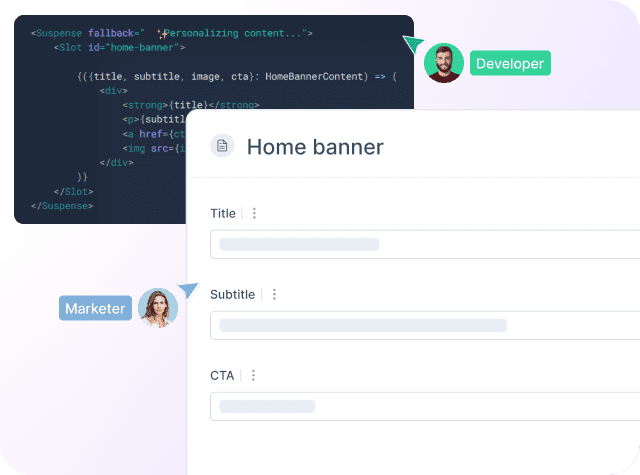
You personalize at the component level rather than the field level. A hero is one slot, not five experiment fields queried in lockstep. When a marketer wants to test a different hero, they change one thing on the platform, and the source code stays untouched.
-
Native personalization and segmentation tools
Croct provides native tools to personalize content for users based on real-time behavior, location, marketing campaign, and other user attributes, making it far more efficient than trying to build similar functionality with Sanity. You won't need a CDP to centralize user data.
-
Bayesian AB testing
Croct includes built-in Bayesian AB testing, which enables you to experiment with different content variations and optimize user experiences quickly. With Croct, setting up tests and measuring results happens in a streamlined, user-friendly manner (something that Sanity cannot offer without heavy custom development).
-
Ease of use for non-developers
Croct's platform is designed for developers, product managers, marketers, and non-technical users. You won't need developers to manage most personalization or testing tasks, reducing your dependency on technical resources.
-
Real-time personalization analytics
Croct allows you to track how different user segments interact with your content in real time, allowing you to adapt experiences on the fly. Dashboards are fueled with real-time data (no sampling), and you don't need to integrate it with another analytics tool.
-
Server-side delivery
Variants are resolved before the page reaches the browser, so there's no flash of default content being swapped out and no Core Web Vitals penalty.
-
Seamless integration
Croct can integrate into your existing tech stack while taking care of personalization and experimentation needs. This means you can still use Sanity for static content management but let Croct handle the aspects that Sanity isn't built for, like dynamic personalization and AB testing.
Why have 3 platforms for content management, AB testing, and personalization when you can have a single one?
But wait, I don't want to switch CMS and rebuild my entire website
The good news is that you don't need to.
Think about your website as a dynamic interface. Some elements are meant to be static, and it's unlikely the growth team will experiment with the main headers, the footer, the blog post content, etc. On the other hand, some elements and components are key for the conversion flow. These are the elements that should live in Croct.

Like Sanity, Croct also lets you model and create components flexibly so the growth team can work with different layouts, structures, content, images, etc., without breaking the design system.
Both static and dynamic content can coexist, and you can gradually move elements from Sanity to Croct, giving the content and the growth team the autonomy they need. Here are some templates to show you how it works.
A reasonable first move: pick the single module with the most traffic and the clearest conversion role, usually the homepage hero, and connect it to a slot. Launch one experience and watch it for a couple of weeks before committing to build a platform.
If your goal is to create dynamic, user-specific experiences and optimize conversions, take the first step by creating your free account and get up and running in just a few hours.