We built Croct to provide everything growth teams need to personalize website content and uncover insights to increase conversions. While our recent updates allowed you to segment users by their past behavior, we knew there was still a missing piece: giving that behavioral data a face.
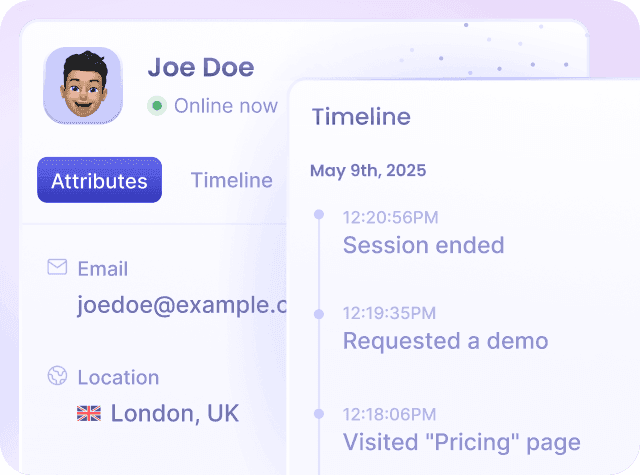
Today, we are thrilled to introduce the Website Visitor Profiles and Timeline. The user profiles area we've built displays a list of users who browse your applications, along with each user's detailed profile, sessions, and events timeline.
Here is a deep dive into how you can use these new capabilities we've developed to explore individual users, understand how they interact with your applications, and fuel your optimization strategy.
Track events, leverage profile attributes, and seamlessly connect anonymous to identified data to dive deeper into individual journeys.
The full story, displayed chronologically
Data points alone lack context. To truly understand your visitors, we believe you need to see their journey unfold.
We designed the timeline to show a chronological view of a user’s sessions and the events that occurred within each one.

It helps you understand how a user navigates your applications over time, what actions they take, and how their behavior evolves across different visits.
We also built the timeline to track concurrent sessions, so you can see when multiple sessions are active at the same time, such as when an identified user browses on a desktop and a mobile device simultaneously.
Seamless identity resolution
In our platform, users can be classified as anonymous or identified. Bridging the gap between these two states is crucial for accurate personalization.
An anonymous user becomes identified after they log in or sign up.
When identification happens, we ensure the information previously collected in the anonymous profile is merged into the identified profile.
This allows you to maintain continuity in the user journey, connecting the activity that occurred before login with the behavior observed afterward.
To protect sensitive user data, we made sure this merge only goes one way: all data we track while the user is identified does not transfer back to the anonymous profile after they log out.
Even though we treat anonymous and identified profiles of the same person as separate users, we keep their sessions connected in the timeline as linked sessions.
A complete snapshot with profile attributes
Visitors' profiles include attributes that provide a snapshot of the user profile, including statistics, behavioral data, and personal information tracked during user interactions.
-
Standard Attributes
The predefined properties we offer include details like the user's first name, email, job title, and company. They also include valuable statistics, such as the total number of sessions and orders placed.
-
Custom Attributes
Because we know every business is unique, we designed profiles to support custom attributes. You can use descriptive names like favoriteColor or loyaltyNumber to track information specific to your business needs.

From analysis to action
Finding insights is only the first step. We built this feature so you can immediately put those insights to work.
-
One-click audiences
While analyzing user profiles, you can click "Use in audience" to create a shortcut to our audience builder. This action pre-fills the criteria, allowing you to quickly create a new audience based on the selected attribute.
-
Live user debugging
We also made it possible to identify live users directly in the list. Live users are visitors who are currently active in your applications, with a tolerance window of up to 10 minutes.
Built for the entire team
We built this feature to bring cross-functional value to anyone looking to optimize the user experience:
-
Growth and marketers
Explore which information is available for users and combine multiple filters, like finding "identified users" who are also "buyers", to focus on specific audiences.
-
Sales teams and SDRs
Run qualitative analysis on individual leads to see exactly what content they consumed before reaching out.
-
E-commerce managers
Follow the timeline to analyze the exact path a shopper took before triggering an "Abandoned cart" event.
-
Developers
Use the live users list to find your own profile during implementation, allowing you to debug in real-time as events arrive and update the profile.
If you are ready to turn every click, engagement, and conversion into growth, jump into your Croct dashboard and start exploring your visitor profiles today!